

Info-Alert
Protecting your profits
with up-to-the-minute-alerts
Info-Alert is a powerful tool
that monitors your business data and provides
automated alerts when various business
conditions are met. Info-Alert serves as a
“virtual employee” that attaches to your
Traverse data and reviews it at scheduled
intervals, reporting the information to the
appropriate people.
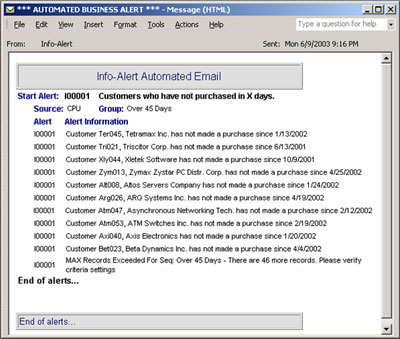
With Info-Alert, you define a
specific set of parameters. When conditions
occur that meet those parameters, an alert is
sent—via email or report—to those individuals
assigned to receive the notification (employees,
customers, vendors, etc.). There are many
predefined alerts, including those in categories
such as Accounts Receivable, Order Entry,
Inventory and Purchasing. For each pre-defined
alert, you can establish a set of criteria; for
example, “Only review customers assigned to a
specific sales rep.”
Info-Alert is quick and easy
to install. Once it is set up, Info-Alert will
run unattended, reviewing your data for
information you have requested. Most other
Microsoft or ODBC-compliant databases in your
office can easily be connected and mapped to
Info-Alert to allow you to generate alerts based
on your company specific data. Info-Alert can
also be configured to send dunning letters to
your customers, send requests to vendors for the
status of late shipments, automatically update
credit hold flags in your customer record and
much more.
|
![[Company Logo Image]](images/sysacc.JPG)







![[Under Construction]](images/undercon.gif)

































