

Sales Order
Order entry, picking,
tracking, billing ... and beyond
Traverse® Sales Order offers a
host of features to improve your efficiency and
increase your flexibility.
Sales Order helps you keep
your customers happy by handling their orders
promptly and correctly. Remaining inventory
balances appear on the screen. Backorder
information is right at your fingertips so
you'll know exactly what's ordered and when it
will ship. And, you can print an online invoice
or picking slip with just a click.
With Traverse Sales Order,
you'll have quick lookup based on customer or
transaction. You can enter, edit, and view
invoices from a single screen, and you'll have
access to all Accounts Receivable reports and
inquiries. In addition, Sales Order provides the
option for two-way split commissions and
multiple tax locations per tax group.
Add, change, or delete codes
for your general ledger distribution accounts or
set up a selection of different receivable
accounts. These general ledger accounts are used
when transactions are posted for the customer.
Sales Order provides the capability to assign
distribution codes to customers when you set up
customer records; then when you post
transactions that involve the customers,
transaction information moves directly to the
accounts you specify for the associated
distribution code.
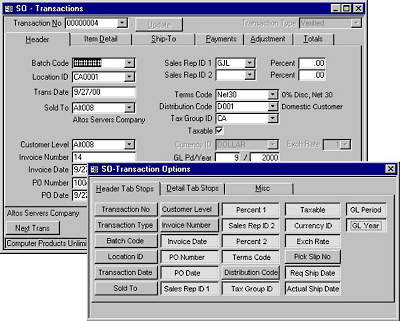
Enter transactions more
efficiently by setting custom tab stops on
fields that are frequently used. |
![[Company Logo Image]](images/sysacc.JPG)







![[Under Construction]](images/undercon.gif)
































