


Bank Reconciliation
Keep Tight Control Over
Your Company's Cash; Manage Capital Wisely
Traverse® Bank Reconciliation
application helps you streamline and improve the
reconciliation of bank statements with general
ledger bank accounts. It makes important updates
to Traverse General Ledger and receives timely
entries from the other applications.
Traverse was developed with
SQL Server, Microsoft Access® and Visual Basic™.
As a result, the user benefits from a seamless
interface to products such as Word, Excel, and
Mail as well as HTML language for the Internet.
You’ll be connected to all members of the
Microsoft Office family, making it easy to share
your information. In addition, Traverse provides
multilingual and multicurrency capabilities.
With Bank Reconciliation,
you'll know which checks have cleared, which
transactions are outstanding, which bank
accounts contain what amounts, and exactly where
your money is. Find errors and record
differences between your books and the bank
easily with two types of reconciliation from the
Reconciliation Report - book-to-bank and
bank-to-book. Reconciling is fast and simple.
You can clear transactions with a single mouse
click--line by line by a specific range of
checks or all at once. If you make a mistake,
reversing a selection is just as easy.
You need to make the best
decisions about the day-to-day operations of
your business. Traverse Bank Reconciliation
gives you the accurate information you need to
make the most of your cash. Using multiple bank
accounts for Accounts Receivable/Sales Order
deposits and Accounts Payable/Purchase Order
checks gives you the flexibility to receive
money and to disburse money from different
accounts.
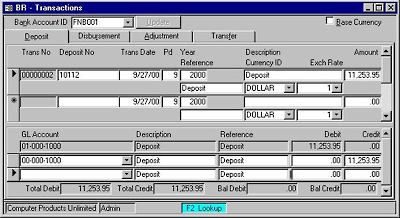
Use the Transactions function
to enter deposits, disbursements, adjustments,
and transfers that have not been created through
other applications. |
![[Company Logo Image]](images/sysacc.JPG)







![[Under Construction]](images/undercon.gif)
































