


Traverse Not-for-Profit
Affordable solutions for
the not-for-profit industry
Traverse Not-For-Profit (NFP)
provides organizations with a cost-effective
solution and a robust set of features frequently
requested by not-for-profit organizations.
Traverse NFP gives you total integration to the
General Ledger, Accounts Payable and Payroll
modules. As with all Traverse applications,
source code is included.
Many NFP's choose Traverse
because of its capability to seamlessly export
any report with the click of just one button to
Microsoft Office products such as Word, Excel™
and Outlook. With Traverse NFP, you can easily
email your budget or financial statements to the
board. Since Traverse General Ledger has a
flexible chart of accounts that handles up to
seven segment categories and 30-character
alpha-numeric numbers, you can create unlimited
funds, programs, grants, activities, departments
and divisions all in one place. The NFP General
Ledger module also has a feature to tag an
account as active or inactive so that your chart
of accounts does not show inactive accounts,
grants, or activities.
NFP organizations track
restricted, temporarily restricted and
unrestricted funds and also need to provide
reports on the activity of these funds. Traverse
NFP tracks these funding activities and
automatically creates due to/from entries as
part of the process. Reports are easily
formatted with the powerful built-in report
writer. The cross-fiscal year reporting for
financial reports and grants—conveniently
located in the general ledger—is another feature
that will save you valuable time.
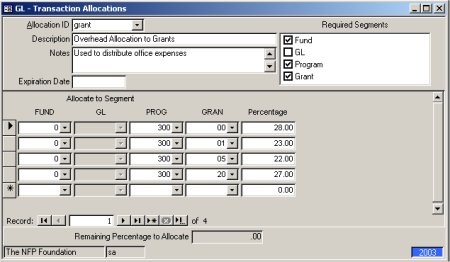
The Allocation feature saves
you a great deal of data entry time by
automatically splitting the Amount to Allocate
among the segments dictated by the allocation
method. The result will be a multiple record
entry for several different accounts in the GL
Transactions screen. This feature is also
included in Accounts Payable and Payroll. |
![[Company Logo Image]](images/sysacc.JPG)







![[Under Construction]](images/undercon.gif)
































